CNC Lathe Simulator Lite3.0.5
Publisher Description

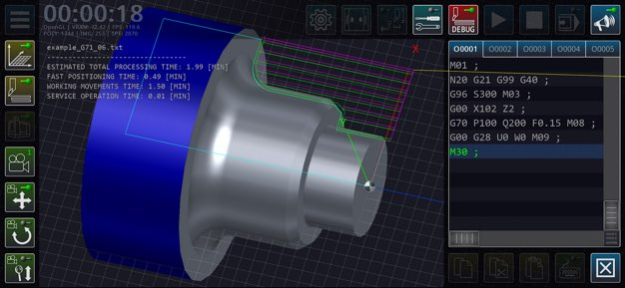


CNC Lathe Simulator is a software simulator of a numerical control lathe is an educational methodological development intended for basic familiarization of novice machine building specialists with the principles of programming parts turning operations using standard G-code (ISO).
The three-dimensional simulation model is based on a lathe with an inclined bed, equipped with a CNC system, a twelve-position turret head, a three-jaw chuck, a tailstock, a system for supplying lubricating and cooling liquid, and other units. The material is processed along two controlled axes.
Field of application of the software product: educational process using computer technology: laboratory lessons of students in computer classes, distance learning, demonstration support of lecture material in the group of areas of training and specialties: «Metallurgy, Engineering and Material Processing».
The main functions of the application: editing the code of control programs of a lathe, operations with control program files, setting up geometric parameters of a cutting tool, continuous/step-by-step execution of control program blocks, three-dimensional visualization of tool movements in the machine’s workspace, simplified visualization of the workpiece surface, calculation of processing modes, a brief reference guide on using G-code.
The graphics component of the software uses the OpenGL 2.0 component base. The graphical user interface of the program is implemented in English.
Limitations of the Light version: it is impossible to change the length of the workpiece, only two positions of the turret head are available.
Version History Edited to comply with age restrictions. 3.0.5 12/16/2025 - fixed the problem of approaching the tool to the contour at the working feed in the G71 and G72 cycles;
- added checking of the minimum and maximum number of generated roughing passes in the G71 and G72 cycles. 3.0.4 07/26/2025 - corrected execution of turning cycles in the inch measurement system;
- corrected execution of chamfers and roundings in the inch measurement system;
- debugged the procedure for cutting off a hollow workpiece;
- improved camera control. 3.0.3 07/22/2025 - updated GUI;
- added 2D visualization mode;
- updated text editor;
- updated type of simulated cnc machine;
- implemented a new parametric editor of the tools;
- added new parameters of the workpiece;
- improved collision checking system;
- updated cutting surface modeling system;
- added tool binding mode using a sensor;
- added cutting mode calculator;
- added expanded built-in help system;
- added quick debugging mode of the control program;
- updated G-code interpreter. 3.0.2 07/14/2025 Implemented the function of automatically adding missing zeros in the G/M codes. 1.1.5 05/18/2020 Graphic errors fixed when using square plate cutters 1.1.4 05/16/2020 Graphic bugs fixed.
The function of returning to the starting point has been added.
Added saving the cycle time on the screen. 1.1.3 04/17/2020 - optimized algorithm for modeling the workpiece shape;
- released an additional 3D view of the workpiece;
- added function for measuring the workpiece;
- inch measurements system is implemented when setting up the machine;
- improved function of setting up the workpiece in a turning chuck;
- fixed a side control panel hide bug;
- added function of fast simulation;
- made other minor changes. 1.1.2 03/31/2020 1.0 02/19/2020
About CNC Lathe Simulator Lite
The company that develops CNC Lathe Simulator Lite is 旭 陈. The latest version released by its developer is 3.0.5.
To install CNC Lathe Simulator Lite on your iOS device, just click the green Continue To App button above to start the installation process. The app is listed on our website since 2026-10-13 and was downloaded 286 times. We have already checked if the download link is safe, however for your own protection we recommend that you scan the downloaded app with your antivirus. Your antivirus may detect the CNC Lathe Simulator Lite as malware if the download link is broken.
How to install CNC Lathe Simulator Lite on your iOS device:
- Click on the Continue To App button on our website. This will redirect you to the App Store.
- Once the CNC Lathe Simulator Lite is shown in the iTunes listing of your iOS device, you can start its download and installation. Tap on the GET button to the right of the app to start downloading it.
- If you are not logged-in the iOS appstore app, you'll be prompted for your your Apple ID and/or password.
- After CNC Lathe Simulator Lite is downloaded, you'll see an INSTALL button to the right. Tap on it to start the actual installation of the iOS app.
- Once installation is finished you can tap on the OPEN button to start it. Its icon will also be added to your device home screen.
Program Details
System requirements
Download information
Pricing
Version History
version 3.0.5
posted on 2026-10-13
Version History Edited to comply with age restrictions. 3.0.5 12/16/2025 - fixed the problem of approaching the tool to the contour at the working feed in the G71 and G72 cycles;
- added checking of the minimum and maximum number of generated roughing passes in the G71 and G72 cycles. 3.0.4 07/26/2025 - corrected execution of turning cycles in the inch measurement system;
- corrected execution of chamfers and roundings in the inch measurement system;
- debugged the procedure for cutting off a hollow workpiece;
- improved camera control. 3.0.3 07/22/2025 - updated GUI;
- added 2D visualization mode;
- updated text editor;
- updated type of simulated cnc machine;
- implemented a new parametric editor of the tools;
- added new parameters of the workpiece;
- improved collision checking system;
- updated cutting surface modeling system;
- added tool binding mode using a sensor;
- added cutting mode calculator;
- added expanded built-in help system;
- added quick debugging mode of the control program;
- updated G-code interpreter. 3.0.2 07/14/2025 Implemented the function of automatically adding missing zeros in the G/M codes. 1.1.5 05/18/2020 Graphic errors fixed when using square plate cutters 1.1.4 05/16/2020 Graphic bugs fixed.
The function of returning to the starting point has been added.
Added saving the cycle time on the screen. 1.1.3 04/17/2020 - optimized algorithm for modeling the workpiece shape;
- released an additional 3D view of the workpiece;
- added function for measuring the workpiece;
- inch measurements system is implemented when setting up the machine;
- improved function of setting up the workpiece in a turning chuck;
- fixed a side control panel hide bug;
- added function of fast simulation;
- made other minor changes. 1.1.2 03/31/2020 1.0 02/19/2020
version 3.0.5
posted on 2025-12-16
Edited to comply with age restrictions.
version 3.0.4
posted on 2025-07-26
Jul 26, 2025
Version 3.0.4
- fixed the problem of approaching the tool to the contour at the working feed in the G71 and G72 cycles;
- added checking of the minimum and maximum number of generated roughing passes in the G71 and G72 cycles.
version 1.1.5
posted on 2020-05-18
May 18, 2020
Version 1.1.5
Implemented the function of automatically adding missing zeros in the G/M codes.
